How flintspark learns and runs a workflow
flintspark turns a browser task into a governed workflow. A person does the task once while flintspark records it. Flint, flintspark's agent, drafts a skill, checks it with two verified runs, then runs it on the fastest route that works. By default it stops and asks a person before anything it cannot undo.
What does a person do to teach Flint?
They do the task once, in the browser, the way they always do it. flintspark records the pages, the clicks, the values typed and the requests the pages make.
Listed personal data is redacted before anything is stored. Before the new skill runs even once, a person checks the redacted recording and approves it.
No script, no flowchart and no connector to build first.
Teach session · recording
- Open weekly regional diesel priceseia.gov · page0:04
- Read next year's forecasteia.gov · page0:19
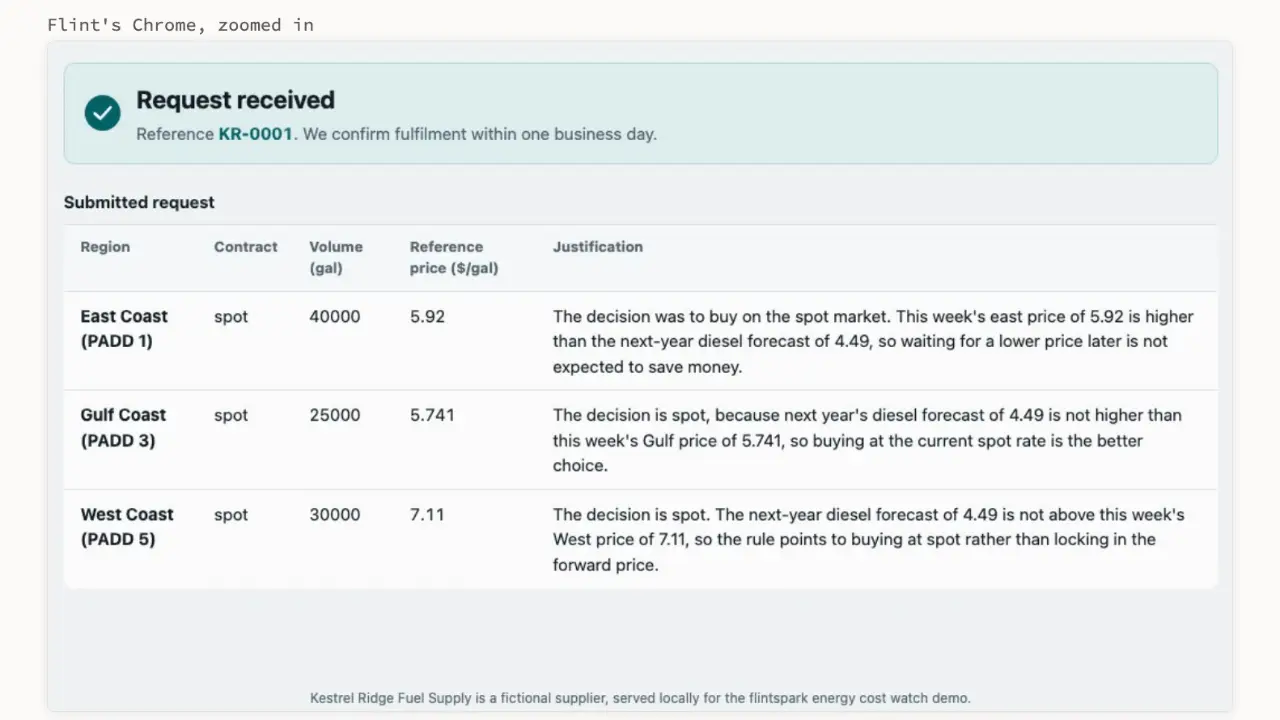
- Fill the request, a reason per regionsupplier portal · form0:41
- Contact on the formsupplier portal · field[email]
Redaction review: waiting for a person
How does Flint map the tools?
Every site gets a site map: its kinds of page, the actions on them and the data requests they make.
A read request a site makes for itself can become a fast route, but only if it is on that site's allow-list. Those routes read by default; a write goes through the page, with approval, unless the site's policy explicitly allows it.
Site map · eia.gov
- Page kinds
- Weekly price table · Forecast table
- Actions
- Pick region · Pick week
- Requests
- Price series, read allow-listed
- Writes
- None on this site
How does a demonstration become a skill?
Flint drafts a skill from the recording: its inputs, its steps, how risky each step is and how to check that it worked. A person reviews that draft and accepts it.
The accepted skill is still only a candidate. It is admitted after two verified runs: its checks pass, and a person or a deterministic check confirms the result. Normal workflows use admitted skills only.
The one exception is a single live-demo run that an operator confirms. It is recorded in the audit log.
Skill · Read regional weekly diesel prices
- Inputs
- region, week
- Steps
- 3, all reads
- Risk
- Read only
- Check
- A price for every region
- Verified run 1checks passed · a person confirmedpass
- Verified run 2checks passed · deterministic checkpass
Admitted
How does a workflow run?
A workflow chains skills, checks, questions and approvals into one business outcome, such as a fuel buying recommendation.
It is durable. It can wait days for a person's answer, and if the server restarts it picks up where it stopped.
Before it redoes an irreversible step after a crash, it checks whether the step already happened. If it cannot tell, it asks a person instead of guessing.
Inbox · your turn
Did the supplier request go through?
The run stopped mid-submit. Flint checked the portal and couldn't tell.
Which route does each step take?
Each step tries the fastest route that works, in a fixed order. Where an official API exists, Flint uses it first.
- APIOfficial API or an allow-listed request
Reads by default, inside the logged-in session.
- AddressA direct page address
Opens the exact page with the inputs filled in.
- ActionsRecorded browser actions
Replays the clicks and typing from the teach session.
- AgentAn AI agent reading the page
Looks at the page and works it out, step by step.
What happens when a step breaks?
Only that step falls back one route, and only when it is safe to retry. A step that may already have acted asks a person instead, so nothing is sent twice.
If the slower route works, the fix is saved as a new version of the skill, on probation. The next run tries it first. The working version stays active until the new one passes its own two verified runs, and either can be rolled back.
An expired login is not a failure: the run pauses and hands the browser to a person.
Skill versions · Read next year's forecast
Runs already in progress keep the version they started with.
How do people watch and steer it?
Whenever Flint looks at or acts on a page, a thin border with a travelling spark runs around that page in its browser. Steps that use an API have no page, so no border.
- Press Esc twice in Flint's browser, or use Take over in the platform, and Flint stops at the next action.
- Questions and approvals wait in the platform's inbox, with the evidence beside them.
- Captchas, two-factor checks and expired sessions always come back to a person.
Flint is working · Esc Esc to take over
How does it get faster over time?
When a step succeeds on a slow route, flintspark turns that run into a faster route for the same step: recorded actions, a direct page address or an API request.
The faster route becomes the step's first choice after three successes in a row. Until then the step quietly falls back if it fails.
Step · Read next year's forecast
Direct page address is now this step's first choice
Three successes in a row, the configured default.
What is not built yet?
Everything above runs today on one operator's machine. These parts do not, yet.
- Teaching Flint by describing a task in words, instead of showing it, is not proven yet.
- So far Flint has been shown on public websites, official APIs and locally served demo sites. Use inside private internal web apps is on the roadmap.
- Cloud browsers, a credential vault and single sign-on are on the roadmap.
- Running several workflows side by side is in build and not yet proven in a live demo.
Questions about this page
How does Flint learn a workflow from one demonstration?
A person does the task once in a browser while flintspark records it. Flint, flintspark's agent, maps the screens, extracts the steps and drafts a skill, which a person reviews. A new skill is admitted only after two verified runs, where its checks pass and the result is confirmed by a person or a deterministic check. Any exception an operator approves is recorded in the audit log.
How is Flint different from RPA?
Flint, flintspark's agent, learns a workflow from one demonstration and repairs only the step that breaks, while traditional RPA bots usually follow scripted steps that someone updates when a screen changes. Flint picks the fastest route that works for each step (API, page address, recorded action or an AI agent reading the page). RPA still fits stable, high-volume, unchanging screens; Flint fits work that changes and needs approval and evidence.
Which AI models does flintspark use?
flintspark is model-agnostic. Each role in a workflow uses the model chosen in configuration, so a team can switch providers without changing workflows.
See Flint run
Bring one workflow you'd rather not do by hand. We'll show Flint learning one like it, and stopping before anything it can't undo.
We reply from hello@flintspark.ai.